Cheat-Sheet
Move and edit
Movements
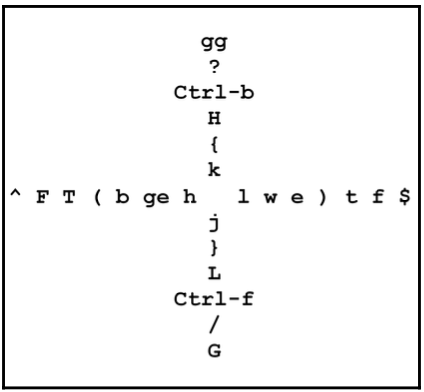
Whole buffer:
gg / G- top and bottom of the buffer.H / L- top and bottom of the window.ctrl+f / ctrl+b- page up and down.
Words:w- next word.e- end of the word.b- beginning of the word.
Chunks (word plus space after):W- next chunk (space sep).E- end of the chunk (space sep).B- beginning of the chunk (space sep).
Line:0 / $- beginning and end of the line.-- first symbol of the line (not space).fS (fa, fb)- find character on the line and jump on it.tS (ta, tb)- find character on the line and before it.
Paragraph:{ \ }- back and forward one paragraph.( \ )- back and forward one sentence.
Edit
di[, di', di"- delete between quotes.cc- change whole line.cw (or ce, c3w, ...)- change to end of the word.cb- change to beginning.c4l- 4 symbols.I / A- start edit on beginning and end of the line.gi- last edit.
Selections in visual mode
v- character.V- line.ctrl + v- block.o- move to beginning or end of selected block.
Copy-Paste
:reg- list of all registers."ay / "ap- copy/paste named register.ctrl+r, a- paste named in insert mode."*p / "+y- to paste from the primary clipboard.
UI
Windows
:split :sp FILENAME / :vsplit :vs FILENAME- open file horizontal or vertical split. Without FILENAME it doubles buffer.ctrl+w, q- close current.ctrl+w, o- close all except current.ctrl+w, (H, J, K, L)- move pane left, down, up, right.ctrl+w, r (or x?)- swap / exchange panes.ctrl+w, - + > < (10 -)- resize pane (10 times).
Buffers
:ls / :b1 / :b cat- list buffers. Switch to buffer with index 1 or with substring namecat.:bn / :bp / :bd- next, previous buffer. Delete buffer.
Tabs
I use plugins for make tabs better, but with legacy vim you need to know basic command.
TODO: Add link to Vim configs page or dotfiles repository.
:tabnew / :tabclose- create, close tab.:tabmove N- move tab to new place.:tabe FILENAME / :tabedit FILENAME- edit a file in a new tab.gt / :tabnext- switch to next tab.gT / :tabprevious- switch to previous tab.
Folding
Firstly, you need to setup fold method. The easiest way is to set indent or syntax method: set foldmethod=syntax. I don't use manual folding.
zo / zc / za- open, close and toggle fold.zR / zM- open, close all folds.
Quickfix
:copen- open quickfix pane (e.g. after:vimgrep).:cn / :cp- next, previous item in quickfix.
Command mode
Shortcuts in command mode
Ctrl + p, Ctrl + n- up and down history.Ctrl + b, Ctrl + e- beginning and end of the line .Shift + left or right arrows- move by words.Ctrl + f- editable command-line.ESC / Ctrl + c- to close the buffer.
Snippets
:vimgrep animal **/* .py- search in filesystem.:w !sudo tee %- save with sudo.%s/\n/r/g- sed replace./ TEXT- search.:hoh- disable highlight.
Tools
Common
vim file.py +14- open on particular line.
Configuration
:set tabstop=4- set variable.:set tabstop?- show variable.
Help pages
:help tabs- open tabs section of help.ctrl+]- jump into link, e.g.:tabdo ....
Terminal
:term- open terminal.Ctrl-w N- to switch to Normal mode within the terminal buffer.Ctrl-w wto navigate between the terminal and other Vim buffers.